Email Deliverability: The Complete Technical Guide for Cold Email Senders in 2026
HotHawk is cold email software for serious outbound teams.
Special offer
Get 50% more sending, FREE.
50% extra sending on any plan, every month.
On this page
Deliverability is whether your email actually reaches the inbox, slips quietly into spam, or gets bounced before anyone lays eyes on it. For cold email, it’s the whole thing. You can write a brilliant email to a perfect list and still hear nothing back, because a mailbox provider took one look and filed you under junk.
It’s also the part most senders barely understand, which is good news if you’re willing to learn it. This guide is the technical hub for the topic. It runs through every factor that decides where your email ends up, roughly in the order they matter, with a deeper guide on each. No single one saves you. Deliverability is all of them working together, and the providers get stricter every year.
The short version
- Deliverability comes down to authentication, reputation, warmup, sending behaviour and content together, not one setting.
- SPF, DKIM and DMARC are mandatory now, not optional, for anyone sending at volume.
- Domain and IP reputation take weeks to build and days to wreck.
- Inbox rotation spreads your volume so no single mailbox burns out.
- Test before you scale, then watch your blacklists and spam rates continuously.
What deliverability actually means
There’s a difference between delivery and deliverability, and it trips people up. Delivery just means the receiving server accepted your email. Deliverability means it reached the inbox, where a human might actually see it. An email can be delivered and completely invisible, sitting in a spam folder nobody opens. The inbox is the only version that counts.
Providers like Google and Microsoft make that call in milliseconds, off signals about who you are, how you behave, and whether people seem to want your email. You can’t force your way in. What you can do is give them every reason to let you through, and stop making the mistakes that get you binned. That’s what the rest of this is about.
1. Authentication: SPF, DKIM, and DMARC
Authentication is the foundation. It proves your email is really from you and hasn’t been forged on the way. Three records do the job, and in 2026 you need all three:
- SPF lists the servers allowed to send for your domain.
- DKIM adds a cryptographic signature, so the provider can confirm nobody tampered with the message in transit.
- DMARC ties the two together and tells providers what to do when mail fails.
Skip these and your volume increasingly gets rejected outright, not just filtered. This is the one part that’s genuinely pass or fail, so it goes first. The full non-technical setup for Google Workspace, Microsoft 365 and custom SMTP is in how to set up SPF, DKIM and DMARC.
2. Domain and IP reputation
Once you’re authenticated, providers start keeping score. Your reputation is a running tally of how much they trust your sending domain and IP, based on how you’ve behaved. A good score buys you the benefit of the doubt. A bad one sends you to spam no matter how good the individual email is.
The catch is the asymmetry: reputation takes weeks to build and days to lose. One sudden volume spike, a wave of bounces, or a run of spam complaints can undo months of careful sending. How providers score it, how to keep an eye on it, and how to recover a damaged one is all in domain reputation for cold email.
3. Warmup: earning trust before you send
A brand-new domain or mailbox has no track record, and providers don’t trust strangers who suddenly start firing out cold email. Warmup fixes that. It quietly builds a history first, sending a slowly rising trickle of email that gets opened and replied to, so the mailbox looks established before your real campaigns start.
Do it with real inboxes rather than bots and it’s what lets a new domain start sending without tripping every spam filter on day one. What it does, how long it takes, and when built-in warmup beats a separate tool is in how email warmup works. HotHawk runs warmup natively against a pool of real Google and Microsoft inboxes, so there’s no third-party tool to bolt on.
4. Sending behaviour: volume, consistency, and rotation
How you send matters as much as what you send. Providers watch for anything that looks automated or aggressive: big volume from a cold mailbox, erratic spikes, the same message fired out at machine speed. The fix is to be consistent and to spread the load.
That second part is where inbox rotation comes in. Rather than pushing all your volume through one or two mailboxes until they cook, rotation shares the sends across many addresses, keeping each one inside safe limits. It’s how teams scale cold email without burning their domains, and it’s covered in inbox rotation for cold email. HotHawk handles rotation automatically across every connected mailbox.
5. List quality and bounce rate
Your list decides more of your reputation than you’d think. Email invalid addresses and you get hard bounces, and a high bounce rate is one of the quickest ways to wreck a domain, because it screams “I don’t maintain my list”, which is exactly what a spammer looks like. Verify your addresses before you send, pull out bounces straight away, and never mail a list you haven’t cleaned. A good reply rate starts with a list of real people.
6. Content and engagement
Content is the last mile, not the first. Once you’re authenticated, reputable and sending sensibly, the message still matters: spammy phrasing, heavy images, link-stuffing and bait-and-switch subject lines all nudge you toward junk. But the bigger thing is engagement. Replies and opens tell providers people want your email. Spam complaints and instant deletes tell them the opposite. Relevance isn’t just good copywriting, it’s a deliverability lever.
7. Testing and monitoring
You can’t manage what you don’t measure. Before you scale a campaign, check where your email is actually arriving and what might be flagging it. After it’s live, keep an eye on spam rates, bounce rates and blacklist status, because reputation drifts. The free and paid ways to do this are in how to test your email deliverability.
If something does go wrong, the worst outcome is a blacklisting, where your domain or IP ends up on a list providers use to block mail. How to check, which lists actually matter, and how to get delisted is in email domain blacklist check.
How the pieces fit together
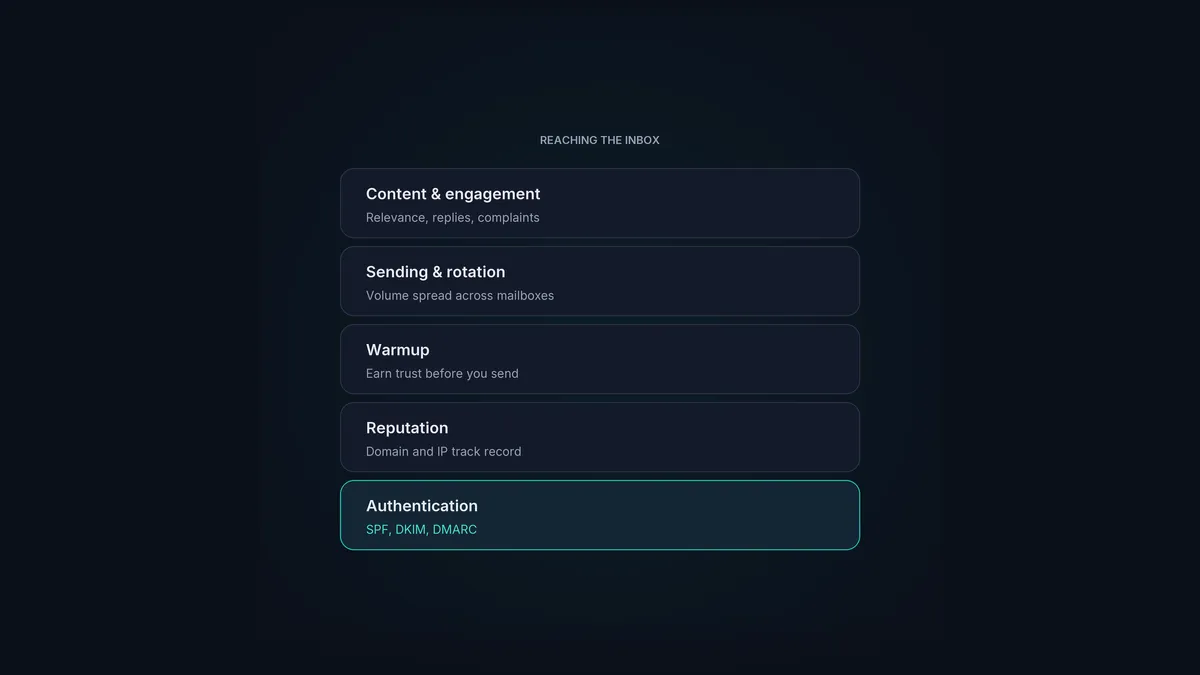
Picture it as a stack. Authentication is the ground floor, and without it nothing above it matters. Reputation is what you build on top, earned through warmup and protected by sane sending and a clean list. Content and engagement are the finish that keeps the thing standing over time. Testing and monitoring are how you spot a crack before it spreads.
A platform built for cold email should carry the heavy parts of this for you. HotHawk runs native warmup on real inboxes, automatic inbox rotation to spread your volume, and analytics that track the numbers that actually predict deliverability, like human reply rate and bounce rate, instead of vanity opens. None of that guarantees the inbox, because no honest tool can, but it takes away the mechanical reasons good email ends up in spam.
Sending built on deliverability
HotHawk pairs native warmup on real Google and Microsoft inboxes with automatic inbox rotation, so your domains stay protected as you scale cold email volume.
See how warmup worksWhen you need a hand
Sometimes the problem runs deep enough to bring in a specialist. An email deliverability consultant digs into why your mail is going to spam and fixes the plumbing underneath. That guide covers what they do, what they charge, and when it’s worth it versus rolling your sleeves up with the steps above.
And because the rules keep moving, it pays to know what’s changed lately: email deliverability in 2026 covers the latest Google, Yahoo and Microsoft sender requirements and what they mean for cold email.
A few common questions
What is email deliverability? Whether your email reaches the inbox rather than the spam folder or getting rejected. It comes down to authentication, sender reputation, warmup, sending behaviour, list quality and content together, not any single setting.
Why does my cold email go to spam? Usually a few things at once: missing or misconfigured SPF, DKIM or DMARC, a cold domain with no warmup, sending too much too fast, a dirty list throwing bounces, or spammy content. Work through the factors above in order and you’ll find the weak link.
Can a tool guarantee inbox placement? No honest one can, because the final call sits with the mailbox provider. What a good tool does is remove the mechanical causes of poor deliverability: native warmup, inbox rotation, clean authentication and proper monitoring.
Deliverability rewards the people who treat it as the system it is. Get authentication right, build reputation patiently with warmup, send consistently with rotation, keep your list clean, stay relevant, and watch the numbers. Do that and you stop fighting the spam filter and start working with it.
