Inbox Rotation: How to Scale Cold Email Volume Without Burning Your Domains
HotHawk is cold email software for serious outbound teams.
Special offer
Get 50% more sending, FREE.
50% extra sending on any plan, every month.
On this page
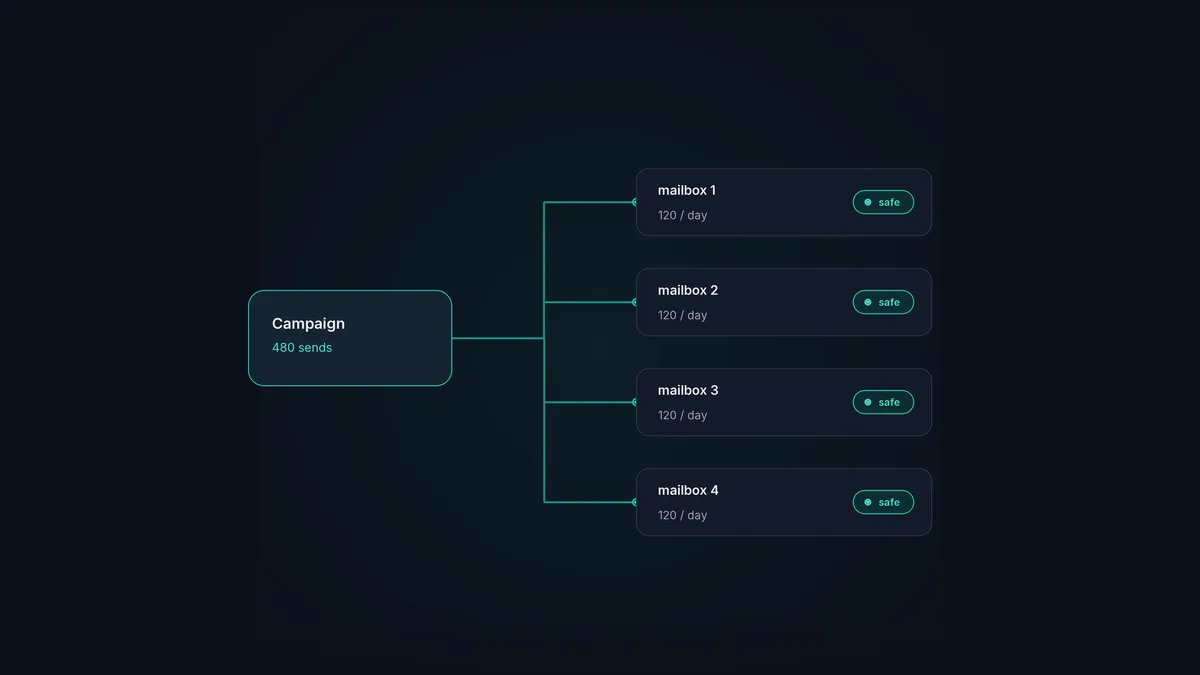
Inbox rotation means sending one campaign’s volume across many mailboxes instead of one, so no single account sends more than is safe. It’s the thing that lets cold email scale at all. A healthy mailbox can only send so much a day before it starts to look dodgy, so when you need to send more, you send from more mailboxes, in rotation.
Without it, scaling cold email means shoving more and more volume through the same few addresses until their reputation caves in and the campaign dies with it. With it, you grow by adding mailboxes, each one sitting comfortably inside safe limits. Here’s how it works and how to run it at scale.
The short version
- Inbox rotation shares a campaign's sends across multiple mailboxes.
- It keeps each mailbox under safe daily limits so none of them burn out.
- It's how you scale volume without wrecking domain reputation.
- Pair it with multiple domains, warmup and gradual ramping.
- Done by hand it's painful; a good sender automates the lot.
Why one mailbox can’t scale
Every mailbox has a ceiling. Send too much from a single address, especially a newish one, and providers read it as spammer behaviour, because real people don’t fire out hundreds of cold emails a day from one inbox. Push past the limit and that mailbox’s reputation drops, its mail starts going to spam, and eventually the account itself is on the line.
So the volume you can safely send from one mailbox is small, often just a few dozen cold emails a day once it’s warmed. If you need to reach thousands of prospects, one mailbox won’t get you there without burning out. The answer isn’t to push it harder. It’s to spread the load.
How inbox rotation works
Rotation treats a pool of mailboxes as a single sending engine:
- You connect several mailboxes, ideally spread across a few domains, each properly authenticated and warmed.
- The campaign shares its sends across the pool. Instead of one mailbox sending 500, ten mailboxes send 50 each, so every account stays inside safe limits.
- Replies still arrive in one place. Good rotation doesn’t scatter your inbox; it pulls the replies from every mailbox back together so nothing slips through. HotHawk’s master inbox does exactly this.
What you end up with is high total volume made up of lots of small, safe, healthy sends. Which is exactly what providers want to see.
Doing it at scale
Rotation is one piece of a bigger scaling setup. To grow volume safely:
- Spread across domains, not just mailboxes. A pile of mailboxes on one domain still piles the risk onto that domain. Use several sending domains, each with its own mailboxes, so no single domain carries everything.
- Warm every new mailbox before it joins the rotation. Drop a cold mailbox into a live campaign and you drag down your results and put the new account at risk. Warm first, add second.
- Respect per-mailbox limits. Set sensible daily caps and let rotation stick to them. You want lots of mailboxes each sending a little, not a few sending loads.
- Ramp the whole pool gradually. Even with rotation, build total volume up over time rather than flipping a switch.
- Keep replies in one place. As the pool grows, managing replies across loads of inboxes by hand becomes impossible. Pull them together from day one.
Why automation matters
Inbox rotation is simple in theory and brutal to do by hand. Picture juggling twenty mailboxes manually: tracking each one’s daily count, deciding which sends next, warming the new ones, sticking to limits, and pulling every reply into one view. It doesn’t scale, and every slip burns an account.
That’s why rotation belongs in the sender, not a spreadsheet. HotHawk runs inbox rotation automatically across every connected mailbox. It spreads the sends to keep each account inside safe limits, warms mailboxes natively, and routes all the replies into one master inbox. You add mailboxes, it handles the rest. That’s the gap between scaling cold email and babysitting it.
Scale volume, not risk
HotHawk spreads every campaign across your mailboxes automatically, keeps each one within safe limits with native warmup, and pulls every reply into one inbox.
See inbox rotationA few common questions
What is inbox rotation? Sending a campaign’s volume across multiple mailboxes instead of one, so each account stays inside safe daily limits. It’s how cold email scales without overloading a single mailbox and damaging its reputation.
How many emails can one mailbox send per day? Fewer than most people think, often just a few dozen cold emails a day once warmed, depending on the mailbox’s age and reputation. To send more, you add mailboxes and rotate rather than push one harder.
Does inbox rotation hurt my reply management? Only if your tool scatters replies across mailboxes. Good rotation pulls every reply into one place, so spreading your sends doesn’t mean scattering the responses. HotHawk routes the lot into a single master inbox.
Inbox rotation is how cold email goes from a few hundred sends to many thousands without burning your domains. Spread the volume, warm every mailbox, keep the basics right, and keep the replies together. For where rotation sits among the other deliverability factors, see the deliverability guide.
