Email Sequencer: The Complete Guide to Automated Cold Outreach
HotHawk is cold email software for serious outbound teams.
Special offer
Get 50% more sending, FREE.
50% extra sending on any plan, every month.
On this page
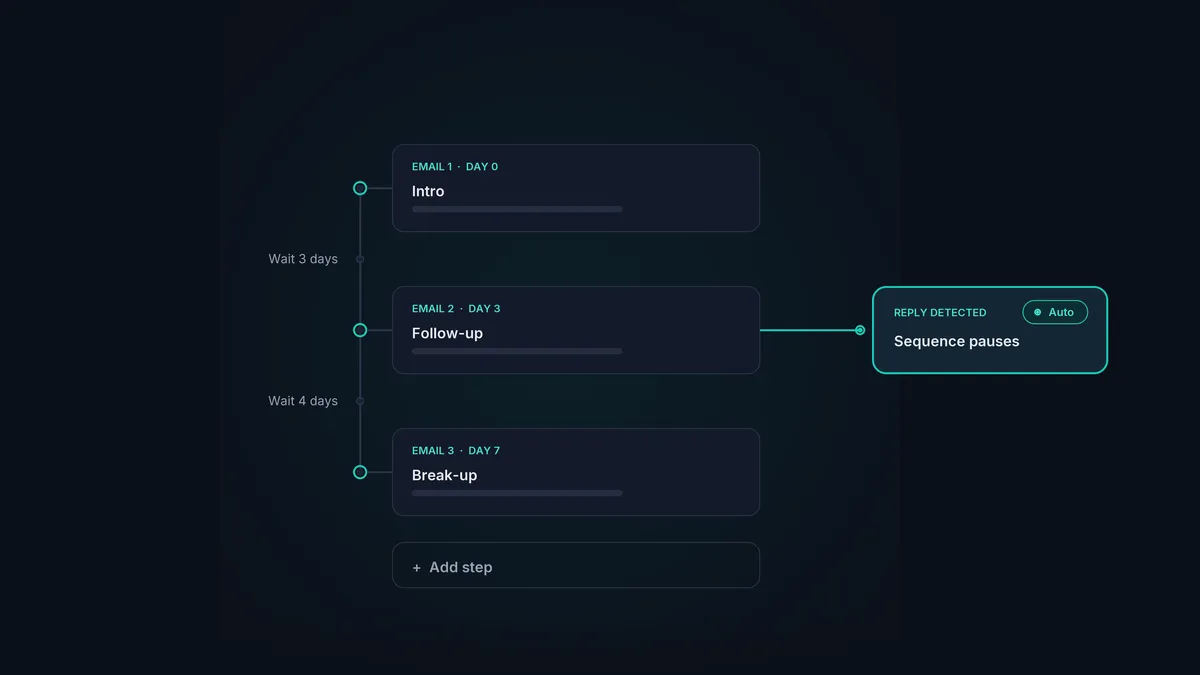
An email sequencer sends a planned series of emails to a list of people automatically, on a schedule you set, and stops sending to anyone who replies. That is the whole idea: instead of writing and timing every follow-up by hand, you build the sequence once and let it run.
For cold outreach at any real scale, this is not a nice-to-have. The difference between one email and a proper multi-step sequence is the difference between a trickle of replies and a pipeline, and doing that by hand across thousands of contacts is impossible. The sequencer is the engine that makes outbound work.
This guide covers what an email sequencer is, how it works, how to build a good sequence, and how to choose a tool that does it well.
The short version
- An email sequencer sends a multi-step email series automatically and pauses for anyone who replies.
- A good cold email sequence is usually 3 to 5 steps, spaced out, each adding a fresh reason to reply.
- The sequencer's real job is deliverability: warmup, inbox rotation and sensible sending decide whether the whole thing works.
- Reply handling matters as much as sending. The best sequencers catch every reply and stop chasing people who answer.
- Pick a tool on deliverability and reply management, not on the length of its feature list.
What is an email sequencer
An email sequencer is software that automates a sequence of outbound emails. You define the steps (the first email and its follow-ups), the timing between them, and the conditions that change what happens next, such as stopping when someone replies. The tool then runs that sequence for every contact on your list, sending each step at the right moment from the right mailbox.
The word “sequencer” points at the core feature: it is built to run a sequence, not to blast a single email. A single send is a one-shot. A sequence is a campaign that unfolds over days or weeks, which is how cold outreach actually earns replies, since most of them come from the follow-ups rather than the first email.
You will see the same idea called a few different things, and the overlap causes confusion. We untangle the exact differences in cold email campaign vs email sequence, but in short: a sequence is the ordered set of steps, a campaign is the whole effort around it, and a sales cadence usually means a multi-channel version that adds calls and social touches.
How an email sequencer works
Under the hood, a sequencer is doing a few jobs at once.
- Steps. Each step is an email: the opener, then the follow-ups. You write them once as templates with merge fields for personalisation.
- Timing. Between steps you set wait periods, so follow-up two goes out three days after the first, and so on.
- Sending. The tool sends each step through your connected mailboxes, spreading the load so no single mailbox sends too much. This is inbox rotation, and it is central to keeping your sending healthy.
- Reply detection. When someone replies, the sequencer pauses their remaining steps automatically, so a real conversation never collides with an automated follow-up. This branching logic is the heart of good email sequence automation.
- Reporting. It tracks what is happening: how many were sent, how many replied, and which step each reply came from.
The reply-detection part is the one people underrate. A sequencer that keeps emailing someone after they have answered makes you look careless, and it is entirely avoidable. We go deep on it in the reply management feature, and it is the thread that ties this whole guide together.
What a good email sequence looks like
The mechanics are easy. The judgement is in the design of the sequence itself. A few principles hold up across almost every campaign.
Length: 3 to 5 steps. One email leaves most of your replies unclaimed; the bulk arrive on the second and third touch. Past five or six, you irritate people and hurt your sender reputation. Three to five is the band that works for most outreach.
Timing: start close, then widen. A workable rhythm is day 0, day 3, day 7, then a wider gap to the final email around day 14 to 21. Early follow-ups stay close while the first email is fresh; later ones spread out so you fade into the background rather than nagging.
Content: one new reason per step. Every follow-up needs to add something new: a different angle, a relevant proof point, a smaller ask. A bare “bumping this” just teaches the reader to skip you. The last step is usually a break-up email, telling the reader you will stop, which is often the highest-replying message of the lot.
How to build your first email sequence
The short version of the build process:
- Define the audience and the one outcome you want (usually a booked meeting).
- Write the first email: short, relevant, one clear ask.
- Add 2 to 4 follow-ups, each with a fresh angle, ending in a break-up.
- Set the timing between steps (day 0, 3, 7, then wider).
- Connect your mailboxes and let rotation spread the sending.
- Turn on reply detection so anyone who answers drops out of the sequence.
- Launch small, read the replies, and adjust before scaling the volume.
We walk through each of these in detail, with examples, in how to build a cold email sequence from scratch. If you want ready-made structures to start from, the sales sequence examples break down ten real ones step by step, and the sales cadence examples cover the multi-channel versions.
Why deliverability decides whether a sequencer works
Here is the part that separates a sequencer that produces meetings from one that quietly sends into the void: the emails have to actually reach people. You can build a brilliant five-step sequence, and if your domain reputation is poor, it sits in spam folders and nothing happens.
So the most important features of an email sequencer are not the clever bits of the builder. They are the unglamorous sending fundamentals:
- Warmup. Email warmup builds and maintains your sender reputation by simulating natural activity, so your mailboxes are trusted before and during a campaign.
- Inbox rotation. Spreading sends across many mailboxes keeps each one’s volume low and natural, which protects your domains as you scale.
- Sensible sending. Sending in working hours, at human volumes, with proper authentication in place.
This is exactly how HotHawk’s email sequencer is built: multi-step sending with automatic inbox rotation, a real warmup pool, and best-practice sending baked in. We do not promise any tool can guarantee inbox placement, because nobody honestly can. What a good sequencer does is give you the practices that protect your reputation, then put the controls in your hands.
An email sequencer built on deliverability
HotHawk runs your multi-step sequences with automatic inbox rotation, built-in warmup and a master inbox that catches every reply. Send at scale without burning your domains.
Start your 7 day free trialHandling replies: the part most sequencers get wrong
Most tools treat sending as the whole job and reply handling as an afterthought. That is backwards. The point of a sequence is to start conversations, and a conversation that nobody sees or answers is wasted.
Two failures do the most damage at scale. The first is chasing someone who already replied, which good reply detection prevents by pausing the sequence the moment they answer. The second is the reply that nobody sees, because at volume you are sending from many mailboxes and the responses scatter, including the forwarded ones and the colleagues who get CC’d.
The fix is to gather every reply across every mailbox into one place and route each to the right person. That is the job of a reply management inbox, and it is HotHawk’s biggest differentiator. The sequencer keeps the campaign moving; the inbox makes sure no answer it earns gets lost.
How to choose an email sequencing tool
The market is full of tools with enormous feature lists, and the feature list is the wrong thing to shop on. Two questions matter far more:
- How good is the deliverability stack? Native warmup on real inboxes, automatic rotation, and dedicated sending options. This sets the ceiling on every campaign you will ever run.
- How good is the reply handling? One inbox for every reply, automatic routing, reply detection that pauses sequences. This decides how many of your replies actually turn into meetings.
Price, multichannel features and lead databases are secondary. We rank the options on what actually matters in best email sequencing tool, and you can see direct head-to-heads on the comparison pages. If you are weighing a CRM’s built-in option, HubSpot sequences vs a dedicated email sequencer covers where that breaks down for cold outreach at scale.
Common email sequencer mistakes
- Treating it as a blast. A sequencer is for relevant, personalised outreach to a good list, not for spraying a bought list. The second route wrecks your domain reputation fast.
- No follow-ups, or too many. One email leaves replies on the table; eight gets you spam complaints. Stay in the 3 to 5 range.
- Ignoring deliverability. The best sequence in the world fails from a cold domain. Warm up, rotate, and authenticate first.
- Letting replies pile up. If a positive reply waits a day to be seen, it cools. Route replies to a person the moment they arrive.
- Generic copy. A sequence is a chance to be relevant at scale, not an excuse to be generic. Personalise one real line per email.
A few common questions
What is an email sequencer used for? Running multi-step cold outreach automatically: sending a planned series of emails to a list, on a schedule, and pausing for anyone who replies. It is the engine behind most B2B outbound.
Is an email sequencer the same as an email campaign? Not quite. The sequence is the ordered set of steps; the campaign is the wider effort. See cold email campaign vs email sequence for the full distinction.
How many emails should a sequence have? Three to five for most cold outreach: the first email plus two to four follow-ups, ending in a break-up. More than that tends to cost more than it returns.
Do I need a separate tool, or can my CRM do it? A CRM’s built-in sequences are fine for warm, connected contacts but tend to fall short on the deliverability and reply handling that cold outreach at scale demands. HubSpot sequences vs a dedicated email sequencer covers exactly where.
An email sequencer is the engine of modern outbound. Build a tight 3-to-5-step sequence, give it the deliverability foundations to actually reach people, and make sure every reply it earns gets seen and answered. Do those three things together and the same list that felt dead starts booking meetings.
