Email Sequence Automation: How to Set Up Automated Cold Outreach That Doesn't Feel Robotic
HotHawk is cold email software for serious outbound teams.
Special offer
Get 50% more sending, FREE.
50% extra sending on any plan, every month.
On this page
The fear with automating cold outreach is that it will feel automated. Mass-produced emails, sent at obviously robotic times, that keep arriving even after you have replied. We have all received those, and they are easy to spot and easy to ignore.
But the problem there is not automation. It is bad automation. Done well, sequence automation lets you send relevant, well-timed, personal-feeling emails at a scale no human could manage by hand, and the recipient never clocks that software was involved. Here is how to set it up so it feels human.
The short version
- Automation is not the enemy; generic, badly-timed automation is. Good automation feels personal.
- Personalise with real detail beyond a first-name token. One true line per email.
- Reply detection is the most important rule: pause the sequence the instant someone answers.
- Send in working hours at human volumes, not in a 3am burst of a thousand.
- Use branching so the sequence responds to behaviour instead of marching on blindly.
What email sequence automation actually is
Email sequence automation is the set of rules that decide what your sequencer does without you touching it: when to send each step, who to send to, and what to do when something changes, such as a reply coming in.
At its simplest it is “send email one, wait three days, send email two”. At its best it is smarter than that: it personalises each send, watches for replies, branches based on what the prospect does, and stops the moment a human conversation begins. The difference between the two is the difference between spam and outreach that works.
Why bad automation feels robotic
Three things give automated outreach away, and all three are fixable:
- Generic copy. “Hi
{first_name}, I wanted to reach out” could have been sent to anyone, and the reader knows it. - Robotic timing. A batch of identical emails arriving at exactly 3:00am, or three of them in two days, screams machine.
- Sending after a reply. Nothing says “nobody is reading this” like a follow-up that arrives the day after you already answered.
Notice that none of these are caused by automation itself. They are caused by lazy automation. Fix them and the same automated sequence feels like a person who is simply organised.
How to keep automated sequences feeling human
Personalise with real detail. A first-name token is the floor, not personalisation. Add one true, specific line per email: their role, a recent company move, the tool they already use, something only someone paying attention would write. That single line carries the whole email past the spam filter in the reader’s head.
Get the timing right. Send in the prospect’s working hours and time zone, at human volumes, with sensible gaps between steps (day 0, 3, 7, then wider). Avoid the tell-tale 3am batch and the three-in-two-days panic.
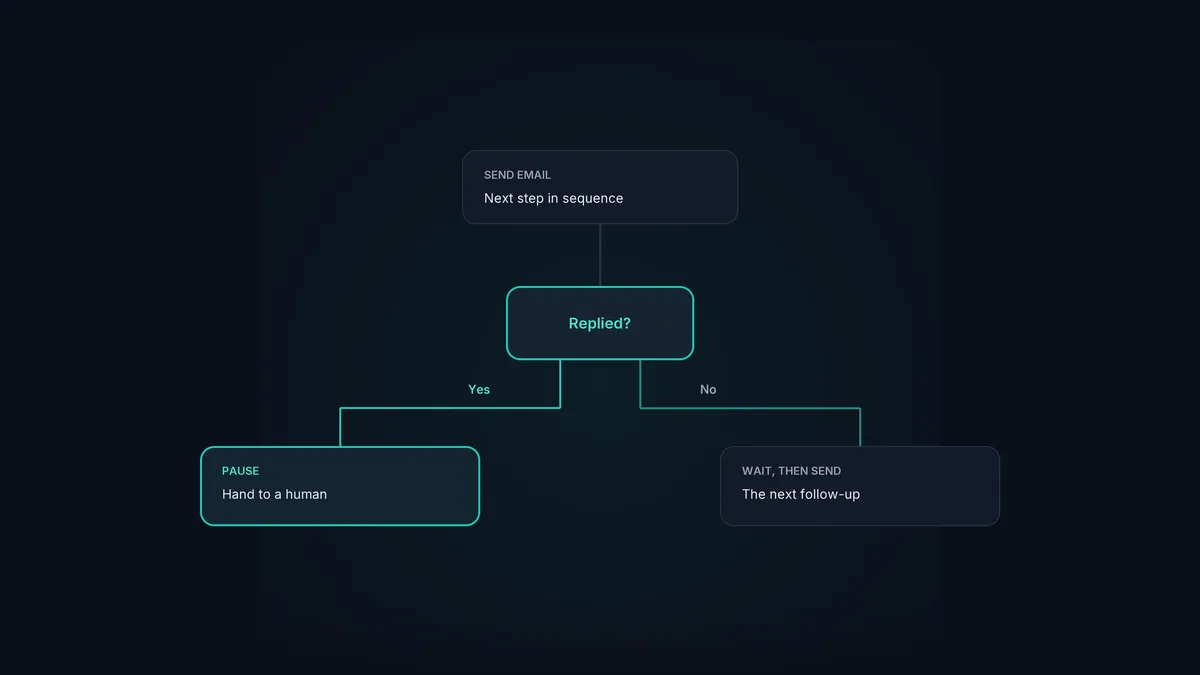
Detect replies and pause. This is the single most important automation rule. The moment someone replies, their remaining steps should stop, so a real conversation never collides with the next templated email. We cover the full picture in reply management, and it is what the branch in any good sequence is really about.
Use branching, not a blind march
Basic automation runs the same steps for everyone regardless of what they do. Good automation branches on behaviour:
- On reply: pause the sequence and route the conversation to a person.
- On a “not now”: drop them into a slower re-engagement track instead of the hard sell.
- On no engagement after the full sequence: stop, and optionally revisit in a quarter.
Branching is what makes a sequence feel like it is paying attention. The reader experiences a system that responds to them, not a conveyor belt that ignores them.
Where automation should stop
Some things should stay manual, and pretending otherwise is how outreach gets robotic again. The reply itself, once a real conversation starts, deserves a human. The high-value, named accounts deserve a personally written first email, not a template. And anything that requires judgement, a nuanced objection, a tricky question, belongs with a person.
The right mental model: automate the repetitive sending and the mechanical rules, and reserve human attention for the conversations and the accounts that earn it. The email sequencer handles the first part so your team has time for the second.
Automation that feels personal
HotHawk automates your sending, timing and reply detection, and catches every reply in one inbox, so your sequences run at scale and still feel human. Try it free for 7 days.
Start your 7 day free trialA few common questions
Does automating cold email make it spammy? Only if it is done badly. Generic copy, robotic timing and emailing people after they reply are what feel spammy, and all three are avoidable. Good automation feels like a person who is organised.
What is the most important automation rule? Reply detection. Pause the sequence the instant someone responds, so a real conversation never collides with an automated follow-up.
What should I not automate? The actual conversation once a reply comes in, the first email to high-value named accounts, and anything needing real judgement. Automate the mechanical parts, keep humans for the rest.
Automation is not what makes cold email feel robotic; carelessness is. Personalise with one real line, time it like a human, branch on what people do, and stop the moment someone replies. Get those right and you can run outreach at a scale no person could match, while every recipient feels like you wrote to them.
