MCP for Cold Email: What the Model Context Protocol Does
HotHawk is cold email software for serious outbound teams.
Special offer
Get 50% more sending, FREE.
50% extra sending on any plan, every month.
On this page
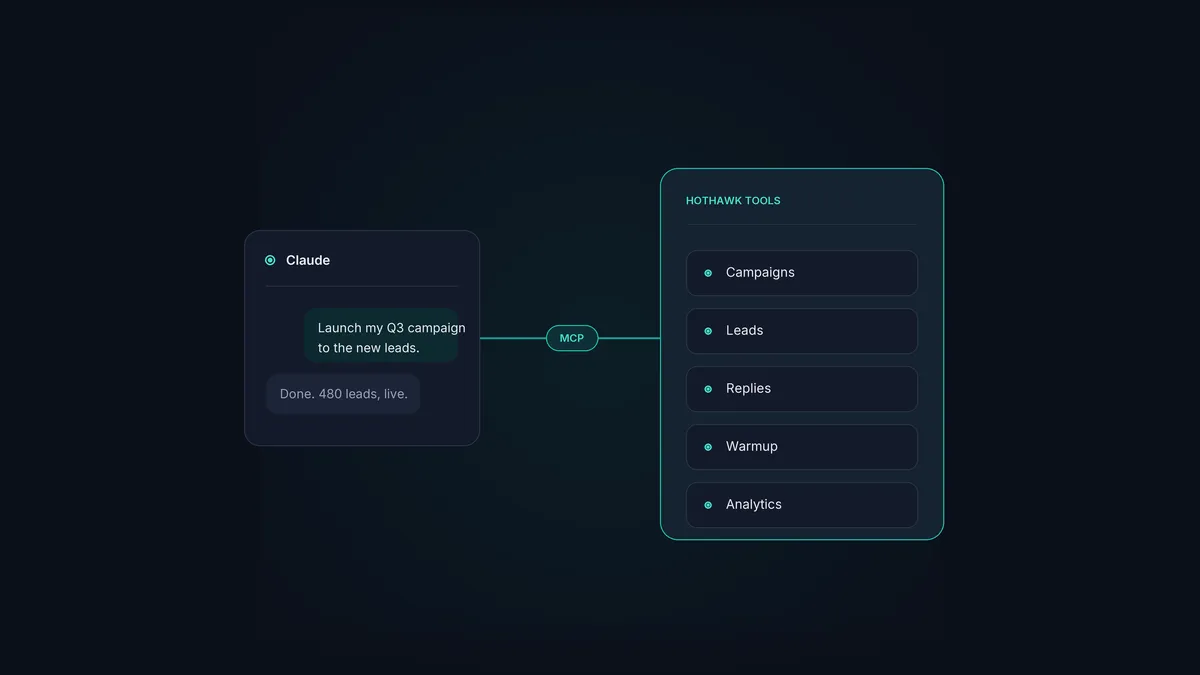
MCP stands for the Model Context Protocol. It’s an open standard that lets an AI assistant like Claude call the tools inside another piece of software directly. For cold email, that’s the difference between an assistant that tells you how to build a campaign and one that just builds it.
It sounds technical, and underneath it is, but the effect on a sales team is simple: you stop clicking through screens and start asking. Here’s what MCP does, why it matters for outbound in particular, and how a cold email team actually uses it.
The short version
- MCP is an open standard that lets an AI assistant operate other software's tools directly.
- For cold email, it turns plain-language requests into real actions: build, send, reply, report.
- The platform exposes its features as tools; the assistant calls them on your say-so.
- A good cold email server covers the whole product, not just sending.
- HotHawk's server connects as a custom connector in a couple of minutes, no code.
What MCP does, without the jargon
Think of MCP as a common plug. Before it, getting an AI assistant to operate your software meant custom integration work for every single tool. MCP standardises that plug, so any tool that exposes an MCP server can be operated by any assistant that speaks the protocol.
A cold email platform’s MCP server publishes its features as a set of tools the assistant can call: create a campaign, add leads to a list, check a mailbox’s warmup, pull reply rates. You type a request in plain language, the assistant works out which tools to call, and the work happens in your real account. No exporting, no copy-paste, no separate automation to maintain.
Why outbound cares about this more than most
Cold email is a lot of small, repetitive operations strung together: spinning up campaigns, segmenting lists, watching variants, triaging replies, checking deliverability. Each one is a few clicks, and a working operation does hundreds of them a week. That’s exactly the kind of work an assistant is good at, once it can actually reach the controls.
- It collapses the click work. “Build a four-step campaign for US time zones and launch it” is one sentence instead of a screen-by-screen setup.
- It puts the data where you’re thinking. “How are variant A and variant Z doing?” pulls the numbers into the chat, so you decide in the same place you ask.
- It keeps you in flow. You act on a reply or pause a losing variant without leaving the window you were already in.
The fundamentals don’t change: you still need a real ideal customer profile and a message worth sending. MCP just takes away the mechanical drag between deciding and doing.
What a complete cold email server covers
Not all servers are equal, and the gap is coverage. A thin one can only send. A complete one can run the operation. The things worth checking it can do:
- Campaigns: build, launch, pause and edit multi-step campaigns.
- Leads: create lists, bulk upload, and sort contacts into the right list.
- Replies: find positive responses in the master inbox and draft answers.
- Deliverability: check mailbox health and warmup status.
- Analytics: pull open, reply and variant performance on demand.
HotHawk holds itself to a clear rule here: if a feature is in the UI, it has an API endpoint, and that endpoint is in the MCP server. So the assistant can do anything you can do in the product, which is still rare among cold email tools.
How a team actually uses it
Setup is the small part: you add HotHawk as a custom connector in Claude once, scoped to the workspace you want it to act in. After that it’s just conversation. A rep asks Claude to launch the week’s campaign, checks how it’s doing at lunchtime, and answers the positive replies in the afternoon, all without opening the app.
The deeper value shows up over weeks. Because the assistant can reach the whole product, the routine parts of running outbound stop being a tax on the rep’s day. The AI cold email workflow with Claude Code walks through a full day of it, and Claude Code vs Cowork covers which Claude surface suits your team.
Connect HotHawk to Claude
Add HotHawk as a custom connector in a couple of minutes, then run your whole cold email operation in plain language. Works in Claude Desktop and the web app.
Connect the MCP serverA few common questions
What does MCP stand for? The Model Context Protocol. It’s an open standard for letting AI assistants call the tools inside other software directly, rather than through bespoke, one-off integrations.
What does MCP do for cold email? It lets an assistant like Claude operate your cold email tool: building campaigns, adding leads, working replies and pulling analytics from plain-language requests, in your real account.
Do I need to be technical to use MCP for cold email? Not with HotHawk. It connects as a custom connector in a couple of minutes with no code. Some other tools use a JSON config file, which is still no-code but more fiddly and desktop-only.
MCP is quietly becoming the feature that decides whether you can run your cold email from an AI assistant or not. The standard is open and the same everywhere; what varies is how much of the product each server exposes. For the wider context, see the AI SDR vs AI sequencer guide.
