AI Reply Handling for Cold Email Inboxes
HotHawk is cold email software for serious outbound teams.
Special offer
Get 50% more sending, FREE.
50% extra sending on any plan, every month.
On this page
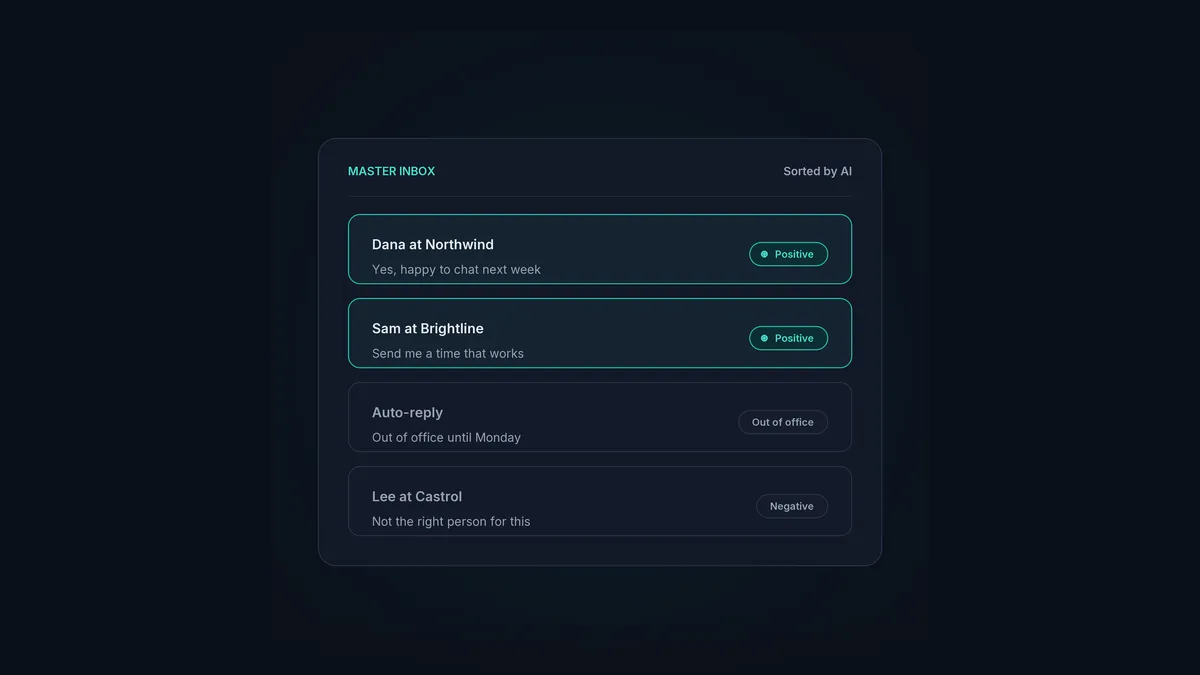
When cold email starts working, the problem moves. It stops being “how do I get replies” and becomes “how do I handle the flood of them across a dozen inboxes without missing the one that matters”. That’s where AI reply handling earns its place: sorting responses by intent, surfacing the hot ones first, and drafting answers, so a positive reply never sits unseen while someone wades through out-of-office notices.
Here’s what AI reply handling actually does, where it genuinely helps, and the line where a human has to take over.
The short version
- AI reply handling sorts incoming responses by intent: positive, negative, out-of-office, and more.
- It surfaces the replies that matter first, so hot leads don't get buried.
- It can draft answers in your voice for a human to approve, which speeds up response time.
- Speed to reply is a real lever; minutes versus hours changes whether a meeting books.
- The judgement on what to say, and the actual relationship, stays human.
The problem it solves
A working cold email operation makes a messy inbox. For every positive reply there are auto-responders, unsubscribes, “not the right person”, and the occasional annoyed one. Spread that across multiple sending inboxes and the signal drowns in the noise. The reply that says “yes, let’s talk” is sitting in there somewhere, and every hour it waits, the meeting gets a little less likely.
Doing this triage by hand is slow and scales badly, which is exactly the profile of work AI is good at. The point isn’t cleverness, it’s making sure the rep spends their attention on the responses that move pipeline.
What AI reply handling does
Three jobs, in order of value:
- Sort by intent. Every reply gets categorised: positive, negative, out-of-office, referral, unsubscribe. The inbox stops being a wall of equal-weight messages and becomes a sorted queue. HotHawk’s reply categorisation does this automatically.
- Surface the hot ones first. Positive replies and referrals get pushed to the top, so a rep sees the meeting-shaped responses before anything else.
- Draft the answer. For the replies that need one, AI drafts a response in your voice, ready for a human to approve, tweak or send. This is where the time saving compounds.
The combined effect is that the rep opens the inbox to a ranked list with drafts attached, instead of an undifferentiated pile to wade through.
Why speed to reply matters so much
The reason this is worth automating is timing. A prospect who replies is, for that moment, thinking about your offer. Reply in minutes and you catch them in that window. Reply tomorrow and the moment’s passed, the context is gone, and the meeting often goes with it. We cover the data on this in speed to reply.
AI reply handling protects that window. By making sure positive replies surface straight away and a draft is already waiting, it cuts the gap between a prospect raising their hand and a human responding, even when the team’s busy or asleep.
Where the human still wins
For all it does, AI reply handling has a hard limit, and it’s the same one as everywhere else in AI cold email: judgement and relationship.
- The tricky objection that needs a real answer is a human job.
- The reply that’s technically positive but actually a brush-off needs a human read.
- The relationship that turns a meeting into a deal is built by a person.
Treat AI as the triage layer that gets the right reply in front of the right rep fast, not as the closer. The AI SDR vs AI sequencer guide covers this split across the whole motion.
Running it from where you work
Reply handling is most useful when it’s wired into the inbox that actually catches the replies. HotHawk’s master inbox pulls every response from every sending mailbox into one place, categorises it, and surfaces the ones that matter. Connect HotHawk to Claude over the MCP server and you can work the whole thing by asking: “show me today’s positive replies and draft a response to each”, reviewed and sent without leaving the chat. If you’re juggling responses across loads of inboxes, managing replies across multiple inboxes goes deeper.
Catch every reply that matters
HotHawk pulls every reply into one master inbox, sorts it by intent, and drafts answers. Work it from Claude over MCP, or straight from the inbox.
See reply managementA few common questions
What is AI reply handling in cold email? Software that sorts incoming responses by intent, surfaces the positive ones first, and drafts answers for a human to approve. It keeps hot leads from getting buried across multiple inboxes and speeds up response time.
Can AI reply to cold emails automatically? It can draft replies, and you can let it send automatically if you choose, but the safer setup is AI drafting and a human approving. That keeps the speed while protecting against mishandled objections and misjudged tone.
Does AI reply handling replace an SDR? No. It takes away the triage drudgery and the blank-page drafting, which frees the SDR to handle the conversations and relationships that actually close. The judgement stays human.
When cold email starts working, reply handling becomes the bottleneck, and AI is the right tool to clear it: sort fast, surface the hot ones, draft the answer, and let a human make the call. Get that loop tight and no positive reply goes cold while you were looking the other way.
