Round-Robin Reply Assignment: How to Auto-Distribute Leads to Your Sales Team
HotHawk is cold email software for serious outbound teams.
Special offer
Get 50% more sending, FREE.
50% extra sending on any plan, every month.
On this page
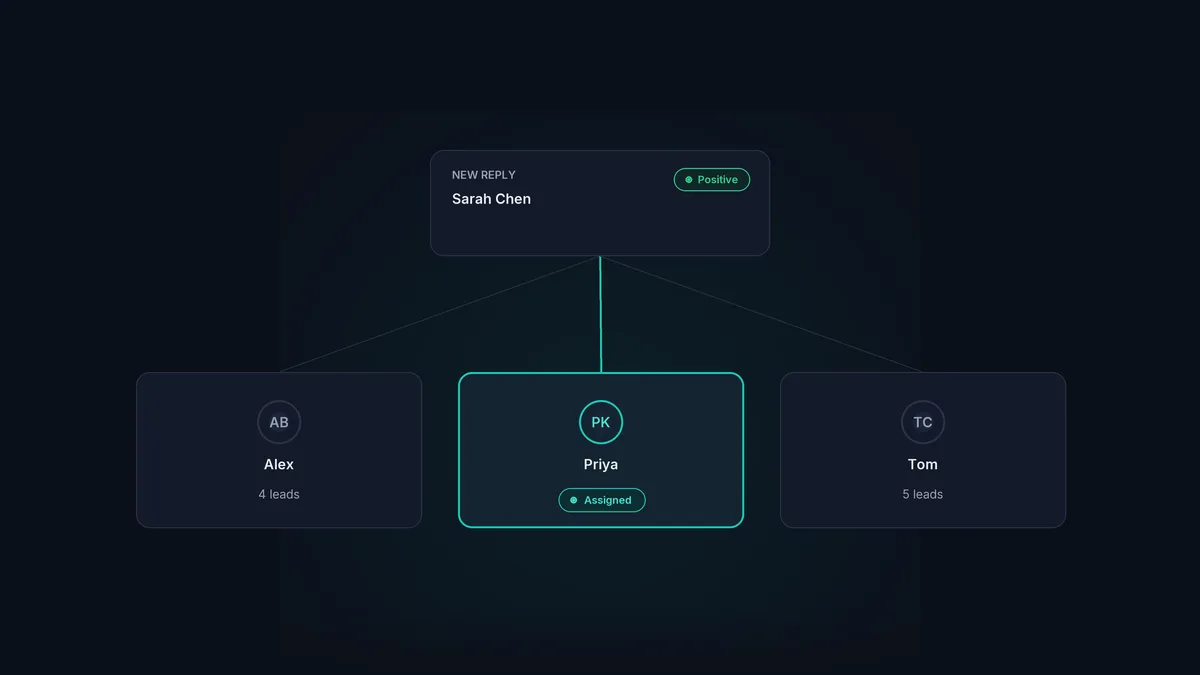
When cold email is working and replies start arriving in numbers, a new question appears: who handles which one? Leave it informal and you get the worst of both worlds. The same eager rep grabs all the good leads, the quieter ones get nothing, and some replies sit untouched because everyone assumed someone else had them.
Round-robin reply assignment fixes that by sharing inbound replies across your team automatically, in turn, so every reply has an owner the moment it arrives. Here is how it works and how to set it up well.
The short version
- Round-robin assigns each new reply to the next rep in rotation, so leads are shared evenly.
- It removes the scramble: every reply gets one clear owner the instant it arrives.
- Even distribution keeps your team fair and your fastest responders from hoarding leads.
- Pair it with mailbox groups when certain replies should go to certain people.
- The real win is speed: an owned reply gets answered while the lead is still warm.
What round-robin reply assignment is
Round-robin is a simple rule: line your reps up in order, and hand each incoming reply to the next person in the line, looping back to the start when you reach the end. Reply one goes to Alex, reply two to Priya, reply three to Tom, reply four back to Alex, and so on.
The point is even, automatic distribution. Nobody picks and chooses, nobody gets overloaded, and every reply is assigned the second it arrives rather than waiting for a human to triage the pile.
Why it matters more than it sounds
Informal reply handling fails in three predictable ways, and round-robin removes all three.
- No more cherry-picking. Without a rule, the most aggressive rep takes the promising replies and leaves the rest. Round-robin shares them fairly, which keeps the team motivated and the pipeline balanced.
- No more orphaned replies. The most expensive miss is the reply nobody owns. When every reply is auto-assigned, there is always a named person responsible, so nothing sits unanswered.
- No more double-handling. Two reps working the same lead is wasted effort and a bad look for the prospect. Clear ownership stops it.
Round-robin versus mailbox groups
Round-robin shares replies evenly with no regard for which campaign or mailbox they came from. That is exactly what you want for a general pool of inbound replies. Sometimes, though, you want replies to go to specific people: a particular client’s replies to the rep who owns that account, or a region’s replies to the team that covers it.
That is where mailbox groups come in. You route replies by the mailbox they arrived on, so the right team always gets the right conversations. Most teams use both: mailbox groups to send replies to the correct pod, then round-robin to share them evenly inside it. HotHawk’s reply management inbox supports both together.
How to set it up well
A few things make the difference between round-robin that helps and round-robin that annoys:
- Keep the rotation list current. Reps go on holiday, leave, or change teams. A rotation that still includes someone who left sends a steady trickle of leads into a void. Make updating it part of your onboarding and offboarding.
- Handle availability. A good system skips reps who are out of office rather than assigning leads they cannot work. If yours does not, you need a manual process to cover it.
- Keep manager visibility. Reps should see their own assigned replies; managers should see everything, so they can spot a reply stuck unanswered and step in.
- Combine with auto-pause. When a rep takes over a conversation, the campaign follow-ups for that contact should stop, so the prospect is not chased by automation mid-conversation.
The real payoff is speed
Fair distribution is the obvious benefit, but the one that moves revenue is speed. A positive reply has a short shelf life. The interest that made someone answer this morning fades through the week, so the gap between a reply arriving and a human responding is where deals are won or lost.
Round-robin closes that gap by removing the triage step entirely. There is no pile to sort, no “who is taking this?” in a channel. The reply arrives, it is assigned, and a named owner can respond straight away. That is why we treat routing as part of reply management rather than an afterthought, and it runs through the wider cold email follow up guide.
Give every reply an owner, instantly
HotHawk auto-assigns inbound replies by round robin or mailbox group, so every lead has a named owner the moment it arrives and nothing goes cold.
Start your 7 day free trialA few common questions
What is round-robin lead assignment? A rule that assigns each new inbound reply to the next rep in a rotation, sharing leads evenly across the team automatically.
Is round-robin better than letting reps claim leads? For fairness and coverage, yes. Manual claiming leads to cherry-picking and orphaned replies. Round-robin guarantees every reply has an owner without anyone having to grab it.
Can I route some replies to specific reps? Yes, with mailbox groups. Route by the mailbox a reply arrives on so certain clients or regions reach the right people, then round-robin within that group.
Round-robin assignment turns a pile of replies into a tidy queue where every lead has an owner from the second it arrives. It keeps distribution fair, stops replies from falling through the cracks, and most importantly, gets a real person responding while the lead is still warm.
