White-Label Cold Email: How to Run Client Outreach Under Your Agency Brand
HotHawk is cold email software for serious outbound teams.
Special offer
Get 50% more sending, FREE.
50% extra sending on any plan, every month.
On this page
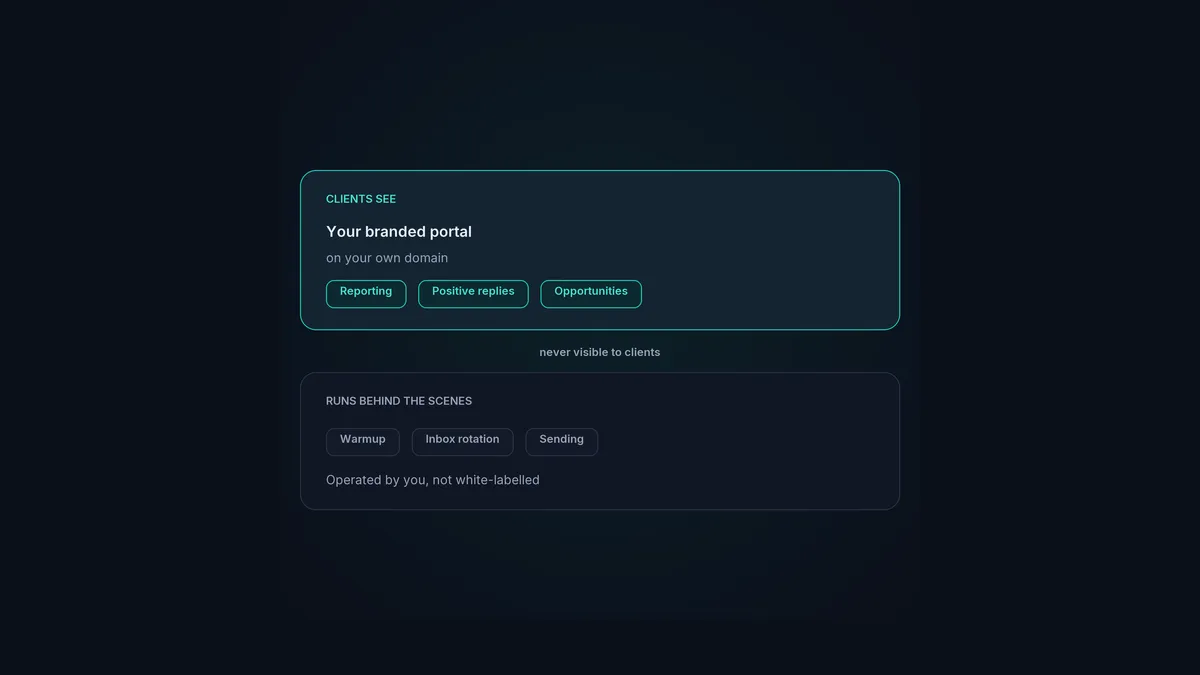
White-label cold email means your clients experience the work as yours, your brand, your domain, your portal, without ever seeing the tools running underneath. For an agency it’s a real edge: it makes you look like a serious operation with its own software, and it stops clients wondering whether they could just cut you out and use the tool directly.
But “white-label” gets used loosely, and it’s worth being precise about what actually gets branded and what doesn’t, because getting that wrong leads to promising clients things you can’t deliver. Here’s what white-label cold email really means, what clients should see, and how to set it up.
The short version
- White-label cold email brands the client-facing results portal as yours, on your domain.
- It white-labels what clients see, the reporting, replies and opportunities, not the machinery.
- The sending, warmup and rotation run behind the scenes; clients never see or manage them.
- Done right, clients experience your brand and your software, never the underlying tool.
- It's a retention and positioning lever, not just a cosmetic touch.
What white-label actually brands
This is the bit people get muddled, so let’s be exact. White-label cold email brands the client-facing results portal: the place your client logs in to see what’s happening. That portal lives on your domain, carries your branding, and shows the client their results as if it were your own software.
What it does not do is white-label the sending machinery. Your warmup, your inbox rotation, your sending infrastructure, those run behind the scenes in your platform, operated by you. Clients never see them, never manage them, and don’t need to. They’re not “white-labelled” because they’re not client-facing at all; they’re the engine in the back room.
That distinction matters. A good white-label setup means the client sees a branded portal full of their wins, while you quietly run the deliverability that produces those wins. Anyone promising clients a “white-labelled warmup tool to resell” has misunderstood what’s going on, the warmup isn’t a thing the client touches.
What clients should see
The art of white-label is controlling exactly what the client experiences. They should see:
- A branded portal on your domain. Your logo, your colours, your login. As far as they’re concerned, it’s your platform.
- Their results. A reporting dashboard showing the metrics you choose to share, live.
- Their positive replies. Delivered cleanly in a white-label inbox, so they see the wins. You decide whether they see negatives and noise or just the positives.
- Their opportunities. Positive replies turned into tracked deals you follow together, so the portal becomes where you share progress.
What they shouldn’t see is the plumbing: the mailbox setup, the warmup pool, the rotation logic, the sending tool’s name. That’s yours to run, and keeping it out of sight is the whole point of white-label.
What clients should never see
Being clear about the hidden half:
- The underlying platform’s branding. If your client can tell which tool you’re really using, the white-label is leaking.
- The warmup and deliverability machinery. This is run centrally by you across all your client mailboxes. Clients don’t see it, manage it, or pay for it as a line item, it’s just part of why their campaigns work.
- Other clients’ data. Each client sees only their own workspace, never anyone else’s.
Keeping all of this behind the curtain is what makes you look like a polished operation with its own software, rather than a reseller of a tool the client could go buy themselves.
How to set it up
With HotHawk, the white-label is ClientBox, and setting it up is straightforward:
- Put the portal on your domain. Point a subdomain, like inbox.youragency.com, at ClientBox, so clients log in to your address.
- Brand it. Add your logo, match the theme to your branding, and customise the login and signup screens so every touchpoint is yours.
- Set per-client visibility. For each client, switch on the reporting sections and reply types you want them to see, and nothing else.
- Run the machinery behind it. Your sending, warmup and inbox rotation run in HotHawk, operated by you, across all your client mailboxes. Clients never see this layer.
The result: clients log in to your branded portal, see their wins, and never know there’s a platform called HotHawk underneath. The ClientBox setup guide walks through the detail.
Your brand, your domain, your portal
ClientBox white-labels the client-facing results on your own domain, while HotHawk runs the warmup, rotation and sending behind the scenes. Unlimited client workspaces included.
See ClientBoxA few common questions
What is white-label cold email? Running client outreach so the client experiences it under your brand: a results portal on your domain, with your branding, showing their reporting, replies and opportunities. The sending and deliverability run behind the scenes, operated by you, and clients never see them.
Can I white-label email warmup? No, and it’s a common misunderstanding. Warmup is infrastructure you run centrally across your client mailboxes, behind the scenes. It isn’t client-facing, so there’s nothing to white-label. What you white-label is the results portal the client logs in to, not the warmup.
What should clients see in a white-label setup? A branded portal on your domain showing their results: reporting, their positive replies, and tracked opportunities. They shouldn’t see the underlying platform’s branding, the deliverability machinery, or any other client’s data.
White-label cold email is a genuine edge for an agency, as long as you’re precise about it. Brand the client-facing portal, run the machinery behind it, and keep the two clearly separate. For the platform that does exactly this, see ClientBox, and for the wider picture, the cold email agency guide.
