Managing Multiple Client Accounts in a Cold Email Sequencer: How to Do It Without Chaos
HotHawk is cold email software for serious outbound teams.
Special offer
Get 50% more sending, FREE.
50% extra sending on any plan, every month.
On this page
Running cold email for one client is easy. Running it for ten, each with their own mailboxes, lists, copy, replies and reports, is where agencies either build a system or descend into chaos. The difference isn’t effort, it’s architecture. Get the structure right and adding a client is routine; get it wrong and every new account makes the whole thing more fragile and more likely to leak.
Here’s the workspace architecture that lets you run a stack of client accounts in one cold email sequencer without mixing anything up, and the operational habits that keep it clean as you grow.
The short version
- Managing many clients cleanly is an architecture problem, not an effort problem.
- Each client needs a fully separate workspace: their own leads, campaigns and replies.
- Your team works across all of them; each client sees only their own.
- Replies from every client's mailboxes need pulling into one place you can work.
- The wrong tool makes this manual and risky; the right one makes it structural.
Why this breaks without a system
The danger when you scale isn’t doing more work, it’s mixing things up. A lead from Client A ending up in Client B’s campaign. A reply routed to the wrong client. A report that accidentally shows one client another’s numbers. These mistakes are rare per send and near-certain at volume across many accounts, and any one of them can lose you a client.
So the goal isn’t just efficiency, it’s safety. You need a structure where it’s structurally impossible to cross client wires, not just unlikely if everyone’s careful. Careful doesn’t scale; architecture does.
The core unit: a workspace per client
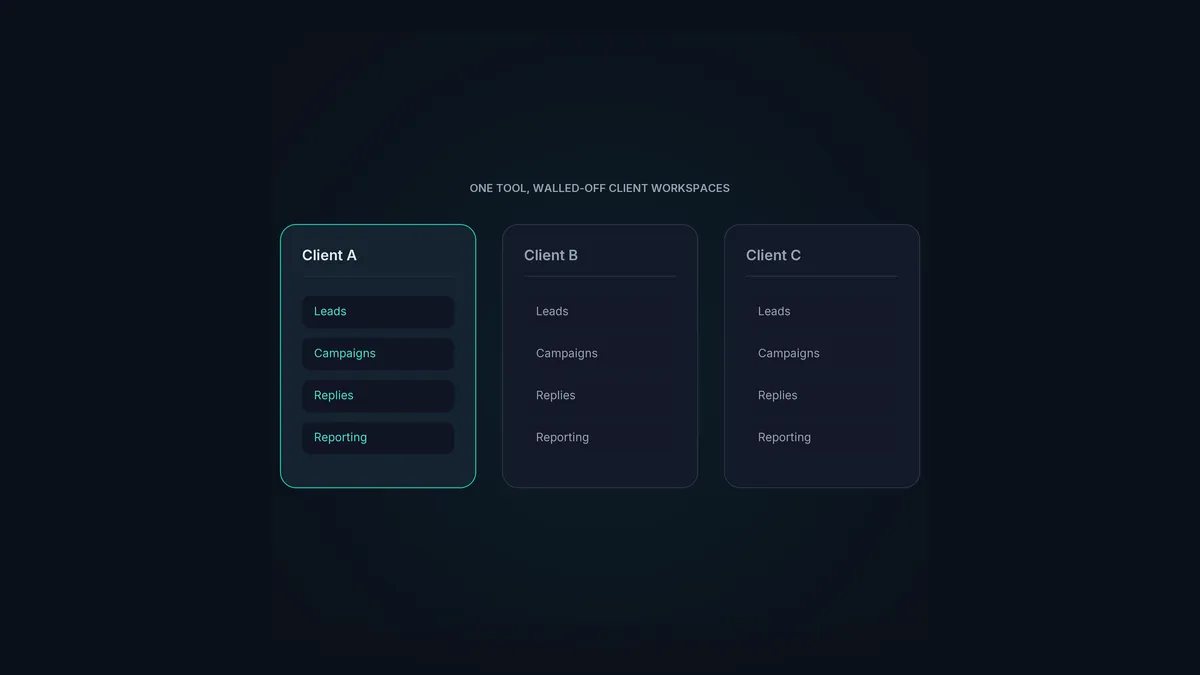
The foundation is simple: every client gets their own fully separated workspace. Their leads, their campaigns, their mailboxes, their replies, their reporting, all walled off from every other client. Nothing is shared across the boundary unless you deliberately share it.
This does two things. It makes cross-contamination structurally impossible, because Client A’s campaign physically can’t reach Client B’s leads. And it makes each client’s view clean, because when you report or open a portal, you’re only ever looking at one client’s world.
Your team, meanwhile, needs to move across all of them. So the architecture has to let you, the agency, jump between workspaces freely, while each client only ever sees their own. That asymmetry, total visibility for you, scoped visibility for them, is the heart of multi-client management.
Deliverability across all of them
Separation handles the data; deliverability handles the results. Across many clients you’re running a lot of domains and mailboxes, and they all need warming and rotating properly, or some clients’ mail quietly rots in spam and they churn.
The key is to run this centrally, as the agency, across every client’s mailboxes, rather than setting it up ad hoc per client and hoping. Warmup on every mailbox, inbox rotation spreading each client’s volume safely, all operated by you in the background. Clients never see this layer; they just see campaigns that work. Doing it centrally is also far less effort than managing it client by client.
Replies: the part that gets messy fastest
Across ten clients sending from several mailboxes each, you might have fifty-plus inboxes throwing replies. Working those by logging into each mailbox is impossible, and it’s exactly where positive replies, the things your clients are paying for, get missed.
The fix is to pull every reply, from every mailbox, across every client, into one master inbox you can actually work, while keeping each reply tied to its client. HotHawk’s master inbox does this: it catches replies across all mailboxes (including forwarded and CC’d ones), keeps them attached to the right client workspace, and lets you route and answer them fast. The same principles as managing replies across multiple inboxes, scaled to many clients at once.
Reporting without the Friday spreadsheet grind
The last piece is reporting. If pulling each client’s numbers means rebuilding a spreadsheet every week, reporting becomes the thing that caps how many clients you can handle. It should be the opposite: each client’s results ready to share, scoped to them, with no manual assembly.
This is where the client workspace and the ClientBox portal pay off. Because each client’s data is already separated, their reporting dashboard is just there, live, on your branded portal, showing exactly the sections you’ve chosen to share. No weekly grind, and the client gets continuous visibility instead of a once-a-month deck.
Many clients, one clean system
HotHawk gives every client a separated workspace, runs warmup and rotation across all their mailboxes centrally, pulls every reply into one inbox, and reports per client via ClientBox.
See HotHawk for agenciesA few common questions
How do I manage multiple client accounts in a cold email tool? Give each client a fully separated workspace, their own leads, campaigns, mailboxes and replies, so nothing can cross between clients. Your team works across all workspaces while each client sees only their own, and you run deliverability centrally across every mailbox.
How do agencies handle replies across many clients? By pulling every reply from every mailbox into one master inbox, with each reply kept tied to its client. Working mailboxes one by one doesn’t scale and loses positive replies; a unified inbox that preserves the client boundary does.
How do I report to many clients without huge manual effort? Keep each client’s data separated from the start, so reporting is scoped automatically, then share it through a per-client portal rather than rebuilding spreadsheets. A live dashboard per client removes the weekly reporting grind entirely.
Managing many client accounts is the operational test every growing cold email agency hits. Solve it with architecture, a separated workspace per client, central deliverability, unified replies, and scoped reporting, not with careful habits. For the full picture, see the cold email agency guide.
